How to Add Music Audio Effects in Kinemaster
Kinemaster is one of the most powerful mobile video editing apps, offering intuitive tools for both beginners and advanced creators. In this guide, we’ll walk you through the complete process of adding music, syncing audio, applying effects, and optimizing your sound for maximum impact.
Importing Your Video
Before you can start adding music and audio effects, the first step is to import your video into Kinemaster. Open the app and tap the ‘+’ icon to create a new project. Choose the appropriate aspect ratio for your platform, such as 16:9 for YouTube or 9:16 for TikTok and Instagram Reels. Next, select the video clip or clips from your device’s gallery and add them to the timeline. Once your video is imported, you can easily start enhancing it with background music, sound effects, and other audio elements to make it more engaging and professional.
Adding Background Music
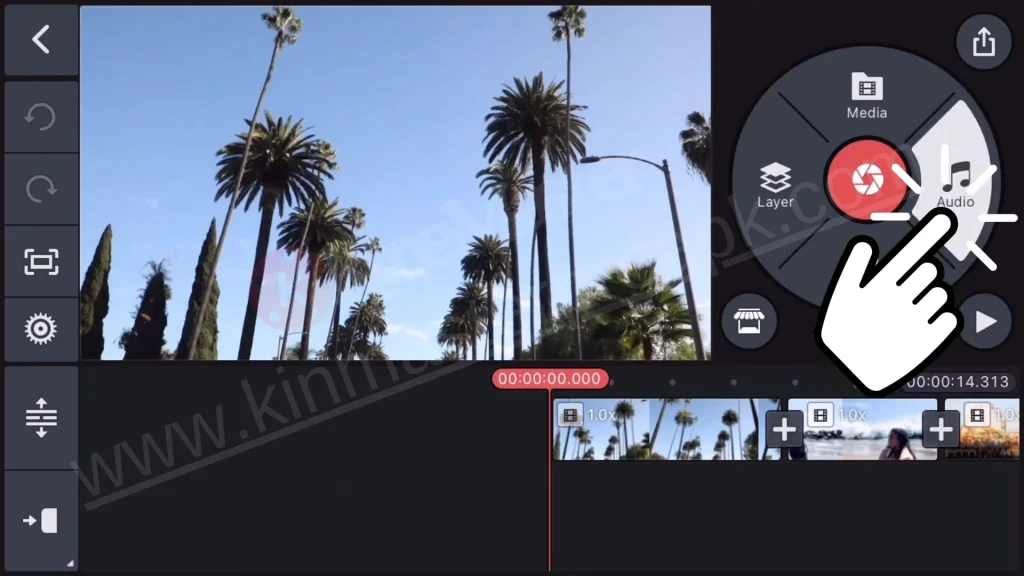
Background music is essential for setting the tone of your video. In Kinemaster Apk, adding music is simple:
-
Tap Audio’ in the toolbar.
-
Browse Kinemaster’s built-in music library or import a track from your device.
-
Tap ‘+’ to add the music to your timeline.
-
Adjust the length, position, and volume to match your video perfectly.
Using background music helps retain viewer attention, emphasizes emotional moments, and makes your content feel polished and professional. Always ensure that you use royalty-free music or tracks you have permission to avoid copyright issues.
Trimming and Syncing Music
Simply adding music is not enough; proper trimming and syncing are crucial for professional-quality videos:
-
Tap on the music track in your timeline.
-
Use the trim handles to remove unwanted portions.
-
Move the track to start exactly where it complements your visuals.
-
Split the track if needed to sync it with different scenes or transitions.
Pro Tip: Sync key moments like scene changes or jumps with beats in the music to increase engagement.
Adding Sound Effects
Sound effects enhance realism and immersion in your videos. Kinemaster includes a variety of built-in effects like applause, whoosh, pop sounds, and more:
-
Tap ‘Audio’ Effects’.
-
Browse available sound effects.
-
Tap ‘+’ to add the effect to your timeline.
-
Position the sound effect accurately to match the visual action.
Use sound effects subtly, as overuse can distract viewers instead of enhancing your content.
Adjusting Audio Volume and Balance
Balancing your audio ensures a professional sound:
-
Tap any audio track.
-
Use the volume slider to adjust the track’s loudness.
-
Make sure voiceovers or dialogues are louder than background music.
-
Apply fade-in and fade-out effects for smooth transitions.
The goal is to make the audio complement the visuals without overpowering them.
Using Multiple Audio Tracks
Kinemaster allows multiple audio layers for greater flexibility:
-
Background music
-
Voiceovers
-
Sound effects
-
Ambient sounds
Each track can be edited individually for volume, length, and position, giving you complete control over your audio mix.
Applying Audio Effects
Kinemaster provides effects such as pitch adjustment, reverb, echo, and speed changes:
-
Tap the audio track select ‘Effects’.
-
Choose the desired effect.
-
Adjust intensity using the provided sliders.
These effects can dramatically enhance your video’s mood, for example, adding reverb to a voiceover can make it sound more cinematic.
Previewing and Fine-Tuning
Before exporting, always preview your video:
-
Tap the play button to watch the full video.
-
Check if the audio syncs perfectly with visuals.
-
Make minor adjustments in timing, volume, or effects as needed.
Using headphones during previewing can help detect subtle audio issues.
Exporting Your Video with High-Quality Audio
Once you’re satisfied with your audio edits:
-
Tap ‘Export’.
-
Select the resolution and frame rate.
-
Ensure audio quality is set to high.
-
Export and share your video on YouTube, TikTok, Instagram, or other platforms.
High-quality audio ensures that your music, sound effects, and voiceovers remain clear and professional, providing the best experience for viewers.
Tips for Better Audio Editing in Kinemaster
To make your videos sound professional:
-
Use royalty-free music to avoid copyright issues.
-
Keep background music subtle when dialogues are present.
-
Match sound effects with visual cues for impact.
-
Experiment with audio layering for depth.
-
Sync audio with music beats to improve viewer engagement.
Conclusion
Adding music and audio effects in Kinemaster Apk Download is a simple yet powerful way to enhance your video content. By carefully choosing background music, syncing it with visuals, applying sound effects, and balancing audio levels, you can transform ordinary videos into professional-quality creations. Kinemaster’s intuitive tools make it easy for both beginners and advanced creators to elevate their videos. With these steps and tips, your content will stand out on YouTube, TikTok, Instagram, and other platforms, captivating viewers from start to finish.